
Most drones don’t survive a splash. The Hover Air Aqua is a waterproof drone that launches from water, lands on it, floats, and flips itself upright if it lands upside down. We combined hands-on testing across kayaks, speedboats, jet skis, and paddleboards to see how it performs.
Quick verdict: The Hover Air Aqua is the best drone we’ve seen for people who spend real time on the water. It is not the best pure image-quality drone, but nothing else lets you fly this low over water without worry.
Hover Air Aqua Key Specifications
| Feature | Specification |
| Waterproof rating | IP67 |
| Weight | Under 250 g |
| Claimed flight time | Up to 23 minutes per battery |
| Real-world flight time | 10–15 minutes of mixed flying with about 32% battery remaining |
| Top speed | 34 mph (55 km/h) |
| Wind resistance | Level 7 |
| Sensor | 1/1.28-inch |
| Lens | 24 mm, f/2.5, hydrophobic coating |
| Video | 4K/100 fps slow motion, 4K/60 HDR, 10-bit HLG (4K/30 only in HLG) |
| Storage | 128 GB internal (no SD card slot) |
| Data transfer | USB-C |
| Batteries in kit | 3, plus a waterproof pouch |
| Controller | “Lighthouse” wearable beacon with RTK positioning |
| Obstacle sensing | Limited, front-facing only |
What Makes the Hover Air Aqua Different?
Most drone releases are incremental upgrades. The Aqua was designed around water from the start.
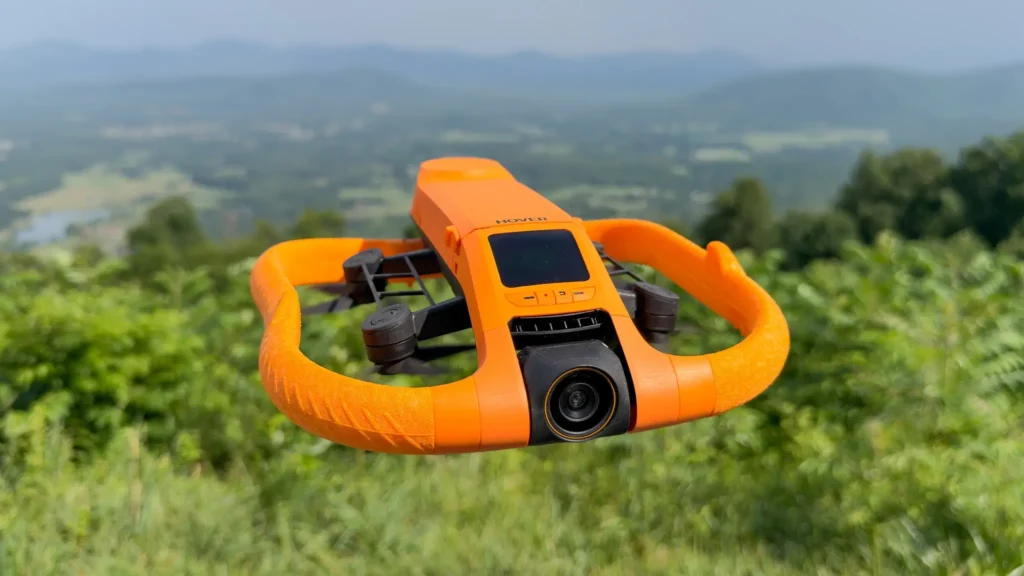
Bright orange, high-visibility design. The color echoes a life ring and makes the drone easy to spot on the water.
Buoyant foam guards. The spongy guards around the edges let the Aqua float.
Turtle flip. If the drone lands upside down, it flips itself upright and takes off again from the surface.
Corrosion-resistant materials. To survive seawater, the Aqua uses titanium screws, ceramic ball bearings, and magnesium alloys.
Hydrophobic lens coating. It reduces water droplets and fogging on the camera.
Top-mounted screen. You can change flight modes and camera settings, adjust quick-shot parameters like distance and height, and play back footage in bright sunlight without opening the phone app.
Water Takeoff and Landing
The Aqua gives you three ways to launch:
- Water launch: Throw the drone into the water and press the takeoff button. It takes off from the surface, and the lens tends to clear itself in the air.
- Hand launch: Press the button, let the propellers spin up, and release. This is the best option when you want the cleanest possible lens.
- Countdown launch: Press once, wait for the 3-2-1 countdown, then let go.
For landing, return-to-home brings the drone back to you, and you can catch it and flip it over. If you don’t, it hovers for about 15 seconds and settles onto the water by itself.
The Lighthouse Controller
The Lighthouse is a small, waterproof beacon worn on your arm, with the black patch facing the sky for the best GPS reception. It uses RTK (real-time kinematics) to tell the drone where you are, combining that with subject recognition for more reliable tracking.
With just the Lighthouse, you can:
- Take off and trigger return-to-home
- Raise, lower, or reposition the drone during a shot
- Cycle through flight modes while the drone is on the water, with an audio prompt for each mode
- Adjust orbit speed on the fly
- Start and stop recording
- Fly manually, with no phone or controller needed
You can also use the Aqua with a phone or tablet for fuller control. That opens up features like Boat Mode, which turns the drone into a small remote-controlled boat, and an underwater camera view.
Flight Modes
The Aqua’s automated modes include:
- Kayak mode: tuned for tracking on kayaks
- SUP (paddleboard) mode: tracking for stand-up paddleboarding
- Orbit follow: the reviewer’s favorite, capturing multiple angles quickly
- Hover, Zoom Out, and Orbit: classic quick shots
- Foil mode: gave the best tracking on a speedboat
Virtual Tether: The Feature That Keeps Your Drone Close
Virtual Tether is one of the Aqua’s most practical features. Set a distance from 5 to 20 meters. When you drift beyond it, the drone takes off, flies back near you, and lands. It’s like a pet on a leash, and it keeps the drone from floating away while you paddle.
Camera and Video Quality
The Aqua has a 1/1.28-inch sensor and an f/2.5 aperture. Testing showed good dynamic range and solid low-light performance for a drone this size.
Color Profiles
- Normal profile: Looks good straight out of the drone.
- 10-bit HLG: A flatter profile that preserves highlight and shadow detail. It needs color grading, but it gives you more flexibility in post. At 4K, it is limited to 30 fps.
Stabilization Options
- Off: Best for use with Gyroflow, which gives an FPV-style look and can lock the horizon. It also produces 4:3 footage, which is easy to crop for vertical video.
- Normal: Fine for most situations.
- Enhanced: Adds horizon leveling for windy conditions or fast sideways movement, but crops the image.
The Aqua also has a dedicated vertical shooting mode for social media content.
Lens Droplets
After water takeoffs, droplets on the lens caused spots in the footage roughly 20% of the time, about 2 in 10 launches. If you need a perfectly clean shot, use a hand takeoff.
Real-World Performance
Kayak and Paddleboard
The Aqua tracked well on both, and the Lighthouse made it easy to fine-tune angles from the boat. It even survived being run over by a paddleboard while submerged, with only some scuffed paint.
Speedboat and Jet Ski
The drone kept pace with a speedboat in windy conditions. On a jet ski, it held on at speeds up to about 55 km/h with the wind behind it and did well below 30 km/h. Sharp turns could make it lose the subject briefly. One tracking and connection loss occurred, and the drone simply landed on the water and was recovered easily thanks to its bright color.
Ultra-Low Flying
Flying inches above the water is normally out of the question. With the Aqua, it’s routine, and you may even pick up some underwater footage as the drone starts recording before takeoff.
Range
Using only the Lighthouse, the drone flew well past a boat in the distance without signal warnings. It isn’t built for long-range flying, but the connection is dependable.
Battery Life
Hover claims up to 23 minutes per battery. In testing, the battery life was more than adequate: one battery yielded a surprising amount of footage, and there was never a moment of frustration over short flight times. The kit includes three batteries and a waterproof carrying pouch.
Obstacle Avoidance: Know the Limits
The Aqua has limited front-facing obstacle detection only, with no 360° protection. In tight mangroves, it tracked impressively and followed the reviewer all the way through. However, in one incident during kayak mode it moved sideways unexpectedly, hit an obstacle, and fell into the water. It flipped itself upright and flew again with no damage. Fly in open space, especially when using orbit modes near obstacles. A repair kit for props and flotation guards comes with some combos.
Care and Maintenance Tips
- Seal the USB-C port cover firmly before every flight, or the drone won’t be fully waterproof.
- Dry the battery area with a towel before swapping batteries.
- Check the water indicator strip. If the white strip in the battery bay turns pink or red, water has entered. Let the drone dry fully until it turns white again before flying.
- Rinse with fresh water after every saltwater flight to prevent salt buildup and corrosion.
Who Should Buy the Hover Air Aqua?
Buy it if you regularly kayak, paddleboard, surf, jet ski, sail, or fish and want dramatic tracking shots without risking a normal drone.
Skip it if you only get on the water a couple of times a year, or if maximum image quality and obstacle avoidance are your top priorities.
Frequently Asked Questions
Is the Hover Air Aqua really waterproof?
Yes. It is rated IP67 and is designed to float, land on water, and take off from it, provided the USB-C cover is sealed.
Can the Hover Air Aqua take off from water?
Yes. It can take off from the surface and even flip itself over if it lands upside down.
How long does the battery last?
Hover claims up to 23 minutes. In real-world use, the flight time was more than adequate for water-sports filming.
Does the Hover Air Aqua have obstacle avoidance?
It has limited front-facing detection only, with no full 360° avoidance.
Does it weigh under 250 g?
Yes, which can simplify regulations in many regions.
Can I use it without a phone?
Yes. The Lighthouse handles takeoff, tracking, positioning, and return-to-home on its own.
How fast can it go?
Up to about 34 mph (55 km/h).
Can it be used in saltwater?
Yes, but rinse it thoroughly with fresh water afterward.
Final Verdict
The Hover Air Aqua solves the biggest problem of filming on the water: the fear of losing your drone. Between the floating design, turtle flip, Lighthouse control, and Virtual Tether, it makes water-sports filming simple. It doesn’t match high-end cinematic drones in every image metric, and the limited obstacle sensin
Read More: DJI RC-N1 vs RC-N2: What’s Actually Different?