
DJI has just released the new Fly App version 1.20.0 alongside a firmware update for the RC2 controllers, version RC2 Firmware V10.00.0100. If you have been following DJI news lately, you will already know that the primary purpose of these updates is to add compatibility for the brand new DJI Avata 360.
On top of that, both updates also address and fix several known issues that have been affecting RC2 controller users for some time now. In this article, we are going to walk you through everything these updates cover, how to apply them, and what to look out for once the update is complete.
Table of Contents
What Are These Updates All About?
The DJI Fly App 1.20.0 and RC2 Firmware V10.00.0100 updates are primarily centered around two things: support for the newly launched DJI Avata 360 and resolving a collection of known issues that have been reported by RC2 controller users over recent months.
A significant number of users have been reaching out about various problems with their RC2 controllers, and it is possible that this latest firmware update addresses many of those frustrations.
If you have previously updated your firmware and still noticed persistent issues, it is worth giving RC2 Firmware V10.00.0100 a try, as additional fixes may have been bundled into this release. If you are still experiencing problems after updating, it would be helpful to share them in the comments so others in the community can be aware.
Read More: DJI Fly App 1.19.5 Update
How to Apply the RC2 Firmware V10.00.0100 Update
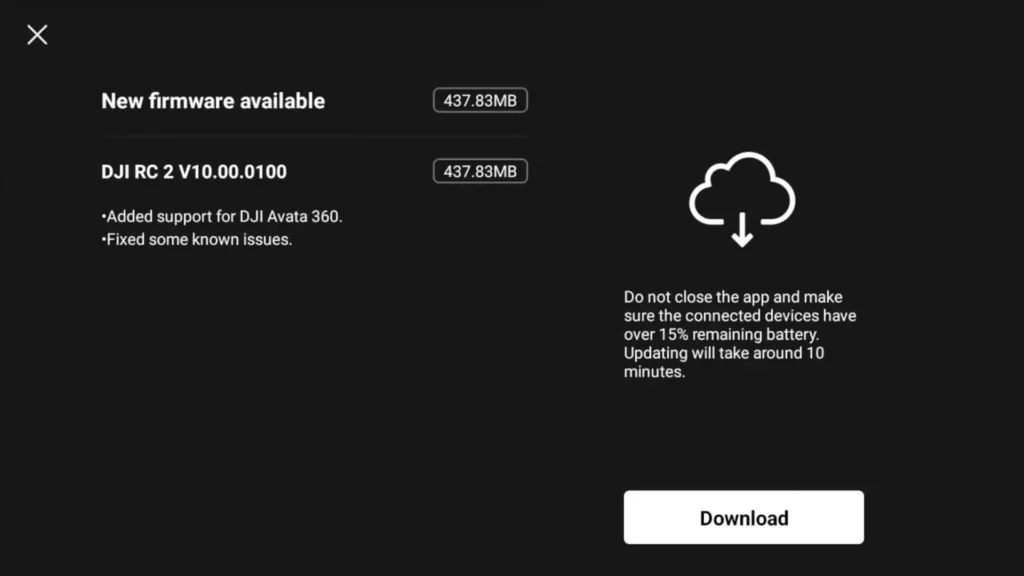
For those who are newer to DJI products and unsure about the update process, it is actually quite straightforward. When you power on your RC2 controller, you will be greeted with an on-screen notification that reads “Update Available.” The message clearly states that the update adds support for the Avata 360 and fixes known issues. From there, all you need to do is download the update and allow it to complete the installation process.
The file size for RC2 Firmware V10.00.0100 is approximately 437 MB, which means it downloads fairly quickly depending on your internet connection. You will also receive a separate update prompt for the DJI Fly App 1.20.0, and the process for that is essentially identical. Simply follow the on-screen instructions and let both updates install without interruption.

What to Check After Updating
Once both the DJI Fly App 1.20.0 and RC2 Firmware V10.00.0100 have been successfully installed, it is always a good habit to go through your settings and confirm that everything is configured exactly as it was before the update. Firmware updates have been known, on occasion, to reset or alter certain settings without any warning, so taking a few minutes to review your setup can save you a lot of trouble in the field.
Start by heading into your advanced safety settings and making sure that the Return to Home function is properly set. This is one of the most important safety configurations on any DJI drone and should always be verified after any update.
Next, navigate to the control settings and check your gain and expo tuning values. These particular settings have been known to change following firmware updates in the past, so it is worth double checking them every single time you update, whether it is a major release or a minor one.
Flight Testing After the Update
To provide some real-world reassurance to the community, a short test flight was carried out using the DJI Mini 5 Pro running DJI Fly App 1.20.0 and RC2 Firmware V10.00.0100. The flight was intentionally kept simple and focused on checking overall stability and reliability rather than performing anything elaborate.
The drone was flown approximately 500 feet out from the home point, in a congested Wi-Fi environment, which is a useful stress test for signal stability and app performance.
During the flight, the Focus Track feature was tested, specifically the Spotlight mode, which locked on and performed exactly as expected with no issues. A Return to Home sequence was also triggered mid-flight to confirm that this critical safety feature was functioning correctly, and it completed the manoeuvre without any problems.
A Dronie shot was also tested and performed smoothly. Overall, the app and firmware proved to be stable throughout the entire flight, giving users every reason to feel confident about updating.
Should You Update to RC2 Firmware V10.00.0100?
This is a question that comes up every single time DJI pushes out a new update, and the honest answer is that it depends on your situation. The general philosophy of “if it is not broken, do not fix it” certainly has its merits, and there is nothing wrong with holding off on an update if your current setup is running perfectly well.
However, if you are experiencing any ongoing issues with your RC2 controller, then RC2 Firmware V10.00.0100 could very well resolve them. The most compelling reason to update right away is if you are planning to purchase or already own the DJI Avata 360. Without this firmware update, your RC2 controller simply will not be compatible with the new drone.
It is also worth noting that DJI has made the Avata 360 available as a drone-only package, which is a thoughtful move for those who already own compatible controllers such as the RC2, the DJI Goggles, or the Motion 3 controller. If you fall into that category, updating to RC2 Firmware V10.00.0100 is not just recommended, it is essential.
Read More: DJI Lito X1 VS Mini 5 Pro: The Budget Drone Battle That Changes Everything